Restaurant management software
Restaurant management software keeps the back office in one place: orders to the kitchen, stock, staff shifts and the day's sales. My Quick Menu is a restaurant platform from Tirana, Albania that gives restaurants a QR digital menu, a website and online table bookings from one dashboard, starting at €5 a month.
Last updated
What is a kitchen display system?
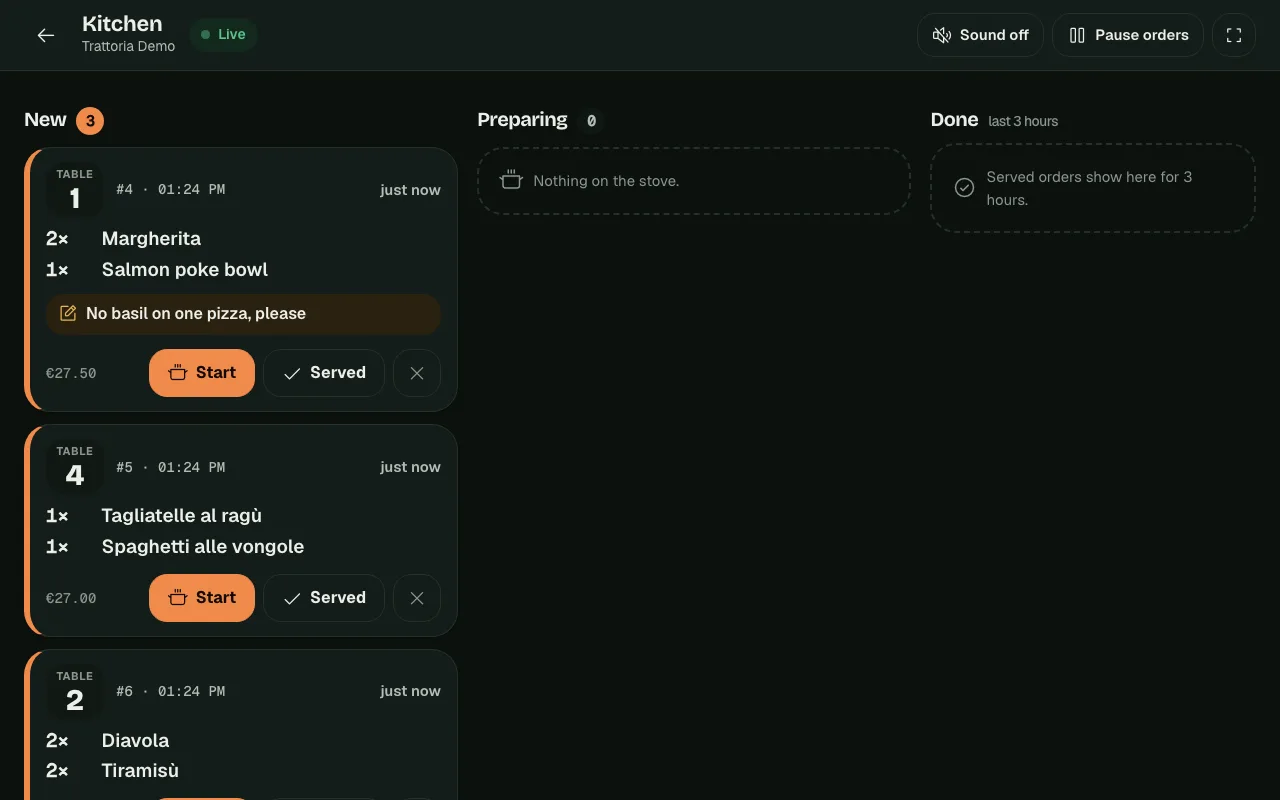
A kitchen display is a screen in the kitchen that shows orders as they arrive, instead of paper tickets. With My Quick Menu, orders guests send from the table appear on it live, with the table number, dishes, sizes and notes. The kitchen moves each order through its stages and the guest sees the status on their phone. The kitchen can also pause new orders during a rush. The kitchen display comes with the table ordering module.
How does stock management work?
List your ingredients with their unit, current level, cost and a low level that warns you before you run out. Give each dish a recipe; when a table order is placed, its ingredients come off the stock automatically, and go back if the order is cancelled. Deliveries, waste and counts are recorded as movements, each with who made it and why, so the history always explains the current level.
Can I plan staff shifts and see daily sales?
Yes. Plan your team's shifts per branch, and close each day with its sales: table orders are added up per business day in your time zone, and the manager records the cash and card counted at closing. Every night the day is saved, so past days are always there to compare.
Does it work for more than one branch?
Yes. Each branch has its own menu, stock, shifts, sales and team, and the overview shows every branch together. Invite your team with the role that fits: managers can run the whole branch and its menu, while editors (for example waiters) can change dishes and mark them sold out.
How much does restaurant management software cost?
Management (stock, recipes, shifts and sales) is €10 a month per branch, and table ordering with the kitchen display is €10 a month per branch, both on top of the digital menu. The Everything plan is €43 a month per branch. Every plan starts with a 14-day free trial. See the full pricing.
The back office, connected to the menu
-
Kitchen display
Table orders arrive live, with notes, sizes and add-ons.
-
Stock and recipes
Ingredients come off automatically as dishes are ordered.
-
Low-stock levels
See what is running low before service, not during it.
-
Shifts and team roles
Plan shifts and give each person the access they need.
-
End-of-day sales
Orders per business day, with the cash and card count.
-
Multi-branch overview
Every branch side by side in one dashboard.
Getting started
Switch on the modules
Table ordering for the kitchen display, Management for stock, shifts and sales.
Add ingredients and recipes
Start with your best-selling dishes; add the rest over time.
Invite your team
Give managers and waiters their own sign-in and role.
What each module includes
| Feature | Module | Price per branch |
|---|---|---|
| Table ordering from the QR menu | Ordering | €10 a month |
| Kitchen display | Ordering | €10 a month |
| Stock, recipes and low-stock levels | Management | €10 a month |
| Staff shifts | Management | €10 a month |
| End-of-day sales and cash count | Management | €10 a month |
| Team roles and multi-branch overview | Every plan | Included |
Pay for what you use
Every plan starts with the menu. Add the rest per branch, switch it off when you don't need it. 14 days free, no card needed.
Questions about restaurant management
Do I need special hardware for the kitchen display?
No. It runs in the web browser of any tablet, computer or TV with a browser, connected to the internet.
Does stock go down automatically?
Yes, for dishes with a recipe: each table order takes its ingredients off the stock, and a cancelled order puts them back.
Can staff see everything?
No. Each team member has a role: editors can change dishes and availability, managers can run the whole branch, and only the owner manages the team and billing.
Can I use management without table ordering?
Yes. Each module can be switched on per branch on its own; the kitchen display needs table ordering because it shows those orders.
Run the kitchen, the stock and the team from one place
Add the modules you need to your menu, branch by branch.
Start free trial