Online table reservation system
An online table reservation system lets guests book a table themselves, at any hour, by picking a free time on a web page instead of calling. My Quick Menu is a restaurant platform from Tirana, Albania that gives restaurants a QR digital menu, a website and online table bookings from one dashboard, starting at €5 a month.
Last updated
How do online table bookings work?
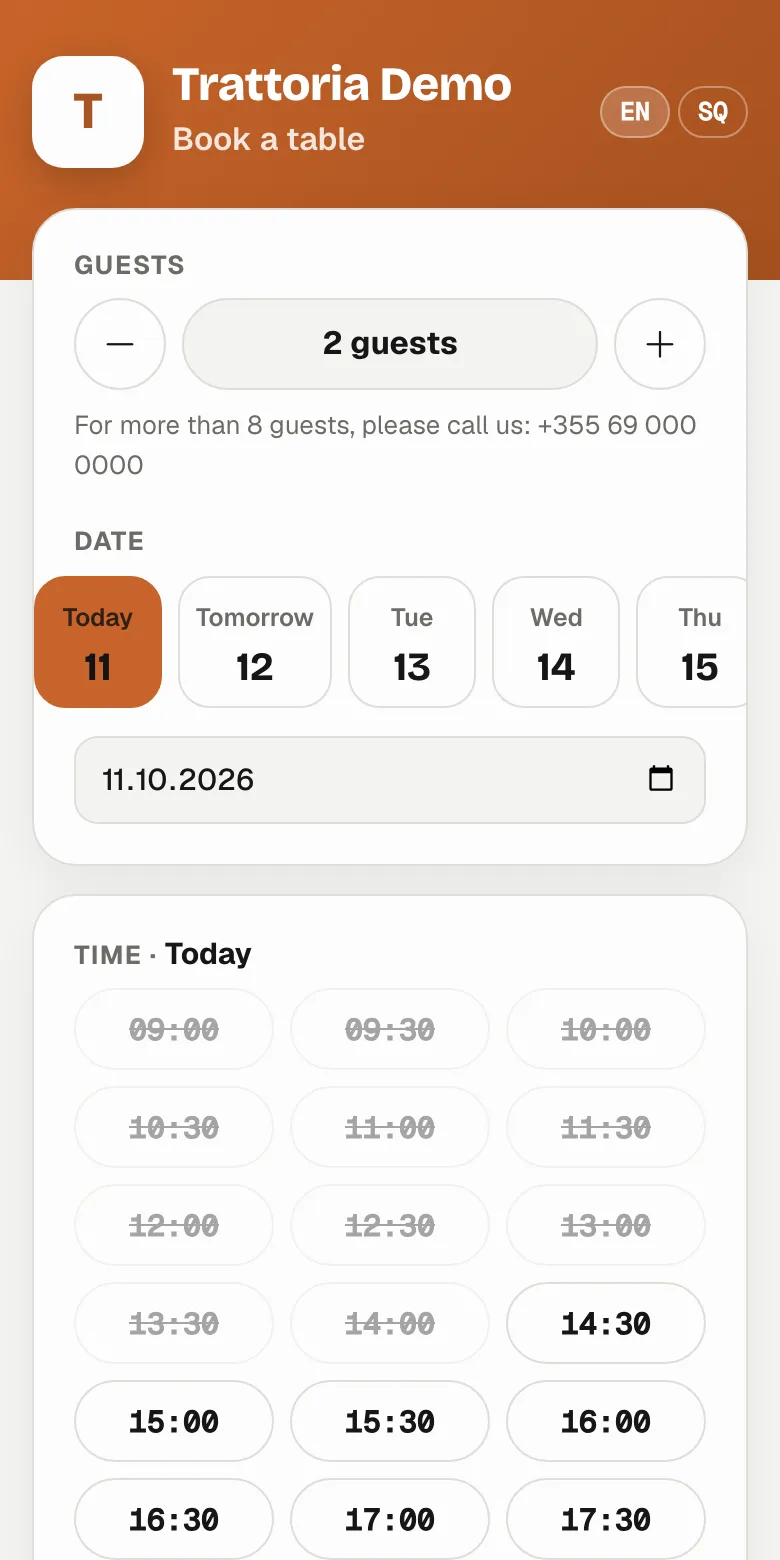
Your restaurant gets a booking page with your name, logo and colours. A guest chooses the day, the number of people and a free time; only times that fit your opening hours and your capacity are offered. They leave a name and phone number and the booking is made. Your booking page has its own link, so you can put it on your website, on your menu, in your Instagram bio or send it on WhatsApp.
You decide the rules: how long a time slot is (30 minutes by default), the largest party that can book online (8 by default), how many days ahead guests can book (60 by default), dates when online booking is closed, and whether bookings are confirmed automatically or by you.
Do guests get a confirmation and a reminder?
Yes. The guest sees the confirmation on screen straight away and, when they leave an email address, receives it by email. A reminder email goes out a few hours before the booking (3 hours by default). Every booking has its own link where the guest can see it, add it to their calendar or cancel it, which frees the table for someone else.
How do I manage the day's bookings?
The bookings page shows the day at a glance: who is coming, when and how many. Mark guests as seated when they arrive or as a no-show when they don't, add bookings that come in by phone, and confirm or decline requests if you approve bookings yourself. To stop fake bookings, one phone number can hold at most three upcoming bookings.
How much does a table booking system cost?
Online bookings are a module on top of the digital menu: €15 a month per branch. The Menu, website and bookings plan is €23 a month per branch. There is no fee per booking or per guest. Every plan starts with a 14-day free trial. See the full pricing.
Bookings without the phone calls
-
Only real free times
Slots follow your opening hours and how many guests you can seat.
-
Book from anywhere
From your menu, your website, Instagram or a WhatsApp message.
-
Reminders
A reminder email before every booking, when the guest leaves an address.
-
No-show tracking
Mark guests as seated or no-show and see who usually comes.
-
Auto or manual confirm
Confirm every booking yourself or let them confirm automatically.
-
In the guest's language
The booking page and messages follow your menu's languages.
Start taking bookings
Set your opening hours
Bookings follow them, including services that run past midnight.
Choose your rules
Slot length, party size, how far ahead, closed dates, confirmation.
Share your booking link
It appears on your menu and website automatically; add it to Instagram too.
Online bookings or phone and notebook?
| My Quick Menu bookings | Phone and notebook | |
|---|---|---|
| Guests can book at night | Yes, any time | Only when someone answers |
| Double bookings | Prevented by the free times | Easy to make |
| Confirmation and reminder | Automatic, by email | Manual calls or messages |
| Guest can cancel | From their booking link | Only by calling |
| No-show history | Kept per booking | On paper |
Pay for what you use
Every plan starts with the menu. Add the rest per branch, switch it off when you don't need it. 14 days free, no card needed.
Questions about online bookings
Is there a fee per booking?
No. Bookings are part of the bookings module's monthly price per branch, however many guests book.
Can I approve bookings myself?
Yes. Turn off automatic confirmation and each booking waits for you to confirm or decline it; the guest is told either way.
Can guests cancel?
Yes, from the link in their confirmation. The table becomes free again for other guests.
Can I stop online bookings on certain days?
Yes. Add closed dates, such as holidays or private events, and those days are not offered online.
Where can guests book from?
From your booking page link, the "Book a table" button on your QR menu and on your website, and anywhere you share the link.
Let guests book while you cook
Turn on online bookings for your restaurant in a few minutes.
Start free trial